
Pinocchio使用资料

Pinocchio使用资料

Porcovsky Lv3

PINOCCHIO GITHUB

PINOCCHIO DOC

INSTALL

GITHUB SUMMER SCHOOL

GITHUB SUMMER SCHOOL NOTES

1. 基本组成

20250615214002

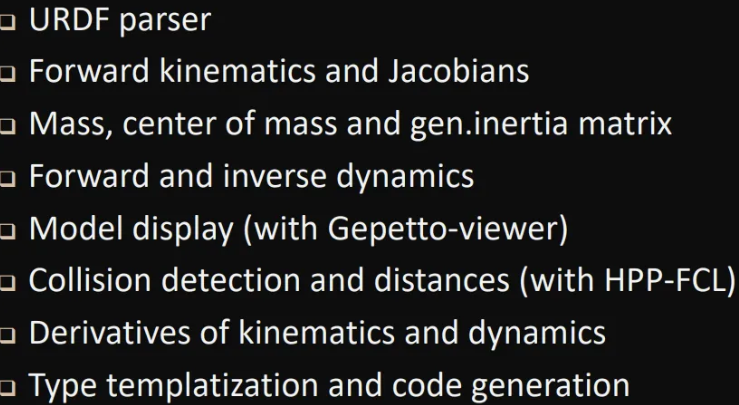
Pinocchio is a modeling library

  • Not an application
  • Not a solver
  •  Some key features directly available

它做不到的事情:

  • Inverse dynamics: TSID
  • Planning and contact planning: HPP
  • Optimal control: Crocodyl
  • Optimal estimation, reinforcement learning, inverse
    kinematics, contact simulation …

2. paper

The Pinocchio C++ library – A fast and flexible implementation of rigid body dynamics algorithms and their analytical derivatives

Pinocchio is written in C++, with a full template-based C++ API, for efficiency purposes. All the functionalities are available in C++. Extension of the library should be preferably in C++.

However, C++ efficiency comes with a higher work cost, especially for newcomers. For this reason, all the interface is exposed in Python. We tried to build the Python API as much as possible as a mirror of the C++ interface. The greatest difference is that the C++ interface is proposed using Eigen objects for matrices and vectors, that are exposed as NumPy matrices in Python.

When working with Pinocchio, we often suggest to first prototype your ideas in Python. Both the auto-typing and the scripting make it much faster to develop. Once you are happy with your prototype, then translate it in C++ while binding the API to have a mirror in Python that you can use to extend your idea.

提升效率的原因:

  1. 充分利用几何描述的稀疏性
  2. 充分利用静态多态性

Pinocchio 支持通过与 CppADCodeGen 库结合,动态生成代码。CppADCodeGen 是基于 CppAD(一个支持自动微分的库)构建的,它可以在运行时生成高效的代码并用于机器人模型的具体计算。

  • 动态代码生成的机制:Pinocchio 在某些计算场景下并不是直接使用预先编写的代码,而是通过运行时生成新的代码。具体来说,它会使用模板化技术和自动微分来生成一些特定的数学表达式或梯度计算公式。这些生成的代码会针对特定机器人的需求进行优化,并且可以在运行时就被直接执行。
  • 优势:通过这种动态编译的方式,Pinocchio 能够根据机器人模型和任务的变化,生成更合适的代码。这不仅提升了性能,还可以减少不必要的计算量。与其每次都运行一个通用的代码逻辑,不如根据不同的情况和需求,生成专门的代码,从而提高效率。

3. DEMO启动

use Pinocchio to verify the dynamics of kuka iiwa7:

source

1
2
3
4
5
6
7
8
9
10
11
12
13
14
15
16
17
18
19
20
21
22
23
24
25
26
27
28
29
30
31
32
33
34
35
36
37
38
39
40
41
42
43
44
45
46
47
48
49
50
51
52
53
54
55
56
57
58
59
60
61
62
63
64
65
66
67
68
69
70
71
72
73
74
75
76
77
78
79
80
81
82
83
84
85
86
87
88
89
90
91
92
93
94
95
from __future__ import division
import pinocchio as pin, math
import numpy as np
from ament_index_python.packages import get_package_share_directory , get_package_prefix
from matplotlib import pyplot as plt
# load the urdf file of your robot model
pkgPath = get_package_share_directory('robotic_arms_control')
# 构建完整的URDF文件路径
urdf_path = pkgPath + '/urdf/engineer_1.urdf'
# 加载URDF模型
model = pin.buildModelFromUrdf(urdf_path)
# model = pin.buildModelFromUrdf('engineer_1.urdf')
print('model name: ' + model.name)
# Create data required by the algorithms
data = model.createData()
NQ = model.nq
NV = model.nv
print('Dimension of the configuration vector representation: ' + str(NQ))
print('Dimension of the velocity: ' + str(NV))
# calculate the total mass of the model, put it in data.mass[0] and return it
total_Mass = pin.computeTotalMass(model,data)
print('Total mass of the model: ', data.mass[0])
# Generating joint position, angular velocity and angular acceleration using quintic polynomials

# 1. Generating position q, initial: 0 deg, end: 60 deg, ouput:rad
def mypoly_p(t):
p = np.poly1d([12*60*math.pi/180/(2*3**5),-30*60*math.pi/180/(2*3**4),20*60*math.pi/180/(2*3**3),0,0,0])
return p(t)

q = np.zeros((61, 7))
for i in range(0, 61):
for j in range(7):
q[i, j] = mypoly_p(0 + 3 / 60 * i) # 61*7 matrix, each column represents a sequence of joint

# 2. Generating angular velocity qdot, initial: 0 rad/s, end: rad/s, ouput:rad/s
def mypoly_v(t):
p = np.poly1d([5*12*60*math.pi/180/(2*3**5),-4*30*60*math.pi/180/(2*3**4),3*20*60*math.pi/180/(2*3**3),0,0])
return p(t)

qdot = np.zeros((61, 7))
for i in range(0, 61):
for j in range(7):
qdot[i, j] = mypoly_v(0 + 3 / 60 * i) # 61*7 matrix, each column represents a sequence of joint

# 3. Generating angular acceleration qddot, initial: 0 rad/s^2, end: rad/s^2, ouput:rad/s^2
def mypoly_a(t):
p = np.poly1d([4*5*12*60*math.pi/180/(2*3**5),-3*4*30*60*math.pi/180/(2*3**4),2*3*20*60*math.pi/180/(2*3**3),0])
return p(t)

qddot = np.zeros((61, 7))
for i in range(0, 61):
for j in range(7):
qddot[i, j] = mypoly_a(0 + 3 / 60 * i) # 61*7 matrix, each column represents a sequence of joint

# Calculates the torque of each joint, return 1*7 vector
Torque = np.zeros((61, 7))
for i in range(0,61):
tau = pin.rnea(model,data,q[i],qdot[i],qddot[i]) # 1*7 vector
Torque[i][:] = tau.T
print('The ' + str(i) + 'th Torque is: ',i,tau.T)

# Computes the generalized gravity contribution G(q), stored in data.g
G_Torque = np.zeros((61, 7))
for i in range(0,61):
G_Tau = pin.computeGeneralizedGravity(model,data,q[i])
G_Torque[i][:] = G_Tau
print('The ' + str(i) + 'th G_Tau is: ', G_Tau)

# Computes the upper triangular part of the joint space inertia matrix M, stored in data.M
M_Matrix = np.zeros((61,7,7))
for i in range(0,61):
M_Temp = pin.crba(model,data,q[i])
M_Matrix[i,:,:] = M_Temp
print('The ' + str(i) + 'th M_Matrix is: ', M_Temp)

#Computes the Coriolis Matrix C
C_Matrix = np.zeros((61,7,7))
for i in range(0,61):
C_Temp = pin.computeCoriolisMatrix(model,data,q[i], qdot[i])
C_Matrix[i,:,:] = C_Temp
print('The ' + str(i) + 'th C_Matrix is: ', C_Temp)

# Verify the anti-symmetric property of dM/dt - 2* C, take the fifth sequence as example
M = pin.crba(model,data,q[5])
dt = 1e-8
q_plus = pin.integrate(model,q[5],qdot[5]*dt)
M_plus = pin.crba(model,data,q_plus)
dM = (M_plus - M)/dt
C = pin.computeCoriolisMatrix(model,data,q[5],qdot[5])
print('The ' + str(5) + 'th C_Matrix is: ', C)
A = dM - 2*C
print('A is: ', A)
res = A + A.T
print('res is: ', res)****

  • 标题: Pinocchio使用资料
  • 作者: Porcovsky
  • 创建于 : 2025-06-15 21:36:45
  • 更新于 : 2025-06-15 21:50:51
  • 链接: https://pocro.github.io/2025/06/15/Pinocchio使用资料/
  • 版权声明: 本文章采用 CC BY-NC-SA 4.0 进行许可。
 评论
此页目录
Pinocchio使用资料